Skip to content

ITP Physical Computing

  • Syllabus Pages
    • Syllabus Fall 2025
    • Assignments
    • Week-to-Week Activity
    • Journals & Documentation
  • Lessons
  • Videos
  • Labs
  • Resources
    • Parts And Tools Guide
    • Microcontroller Pin Functions
    • Breadboard Layouts
    • Introduction to the Nano 33 IoT
    • Introduction to the Nano R4
    • Construction Links
    • Related Books and Articles
    • External Links and Resources
    • Tips from Instructors
  • Pcomp @ ITP
Previous Image
Next Image

LabTwoAnalogIn_schem

Schematic drawing of two force-sensing resistors and two LEDs attached to an Arduino. The Arduino is represented by a rectangle in the middle with lines on each side representing the pin connections. On the left side of the rectangle, two variable resistor are connected to analog in pins 0 and 1, respectively. The other ends of the variable resistors are connected to the 5-volt pin on the Arduino, shown at the top of the rectangle. Two fixed 10-kilohm resistors are connected to analog in pins 0 and 1 as well. The other ends of the fixed resistors are connected to ground, shown on the bottom of the rectangle. On the right side, two 220-ohm resistors are connected to pins D9 and D10, respectively. The other connections of the resistors are connected to the anodes of two LEDs. The cathodes of the LEDs are connected to the ground pin of the Arduino.
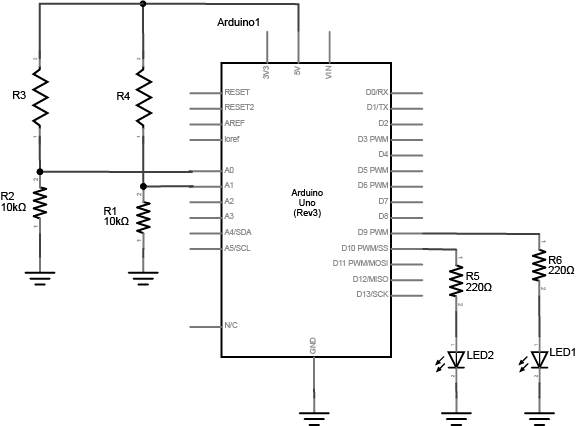
Schematic view of two force-sensing resistors and two LEDs attached to an Arduino.

Posted on August 28, 2014August 14, 2018 Full size 577 × 426

Post navigation

Published inLab: Analog In with an Arduino
QR code of this site's URL

Find Content by Category:

  • Syllabus Pages
    • Syllabus Fall 2025
    • Assignments
    • Week-to-Week Activity
    • Journals & Documentation
  • Lessons
  • Videos
  • Labs
  • Resources
    • Parts And Tools Guide
    • Microcontroller Pin Functions
    • Breadboard Layouts
    • Introduction to the Nano 33 IoT
    • Introduction to the Nano R4
    • Construction Links
    • Related Books and Articles
    • External Links and Resources
    • Tips from Instructors
  • Pcomp @ ITP
ITP Physical Computing Proudly powered by WordPress