Intro to Physical Computing Syllabus

Research & Learning

Other Class pages

Shop Admin

ITP Help Pages
Tom's pcomp site
DanO's pcomp site


DC Power Supply

Parts.DCPowerSupply History

Hide minor edits - Show changes to markup

May 14, 2009, at 04:41 PM by rmn236 -
Changed lines 44-45 from:

It is always good practice to test a power supply before using it for the first time.

to:

It is always good practice to test a power supply before using it for the first time. The example below will show how to test a power supply with positive polarity. If you have a negative polarity power supply, then you will get a negative reading. You should then switch the position of the multimeter probes.

May 14, 2009, at 04:38 PM by rmn236 -
Deleted line 41:

(:if auth edit:)

Added line 55:

(:if auth edit:)

January 22, 2009, at 06:07 PM by rmn236 -
Changed line 51 from:
  1. On your multimeter you should see a reading of the voltage coming from your power supply. If you are checking a 12V power supply and your multimeter shows "12.54V" everything is fine and dandy. If you get a reading of "-12.54V" then your probes are attached in reverse. If this happens and you are positive you connected your probes correctly, double check the polarity on your power supply's label and make sure the circuit you will be powering with this unit is designed to handle this polarity.
to:
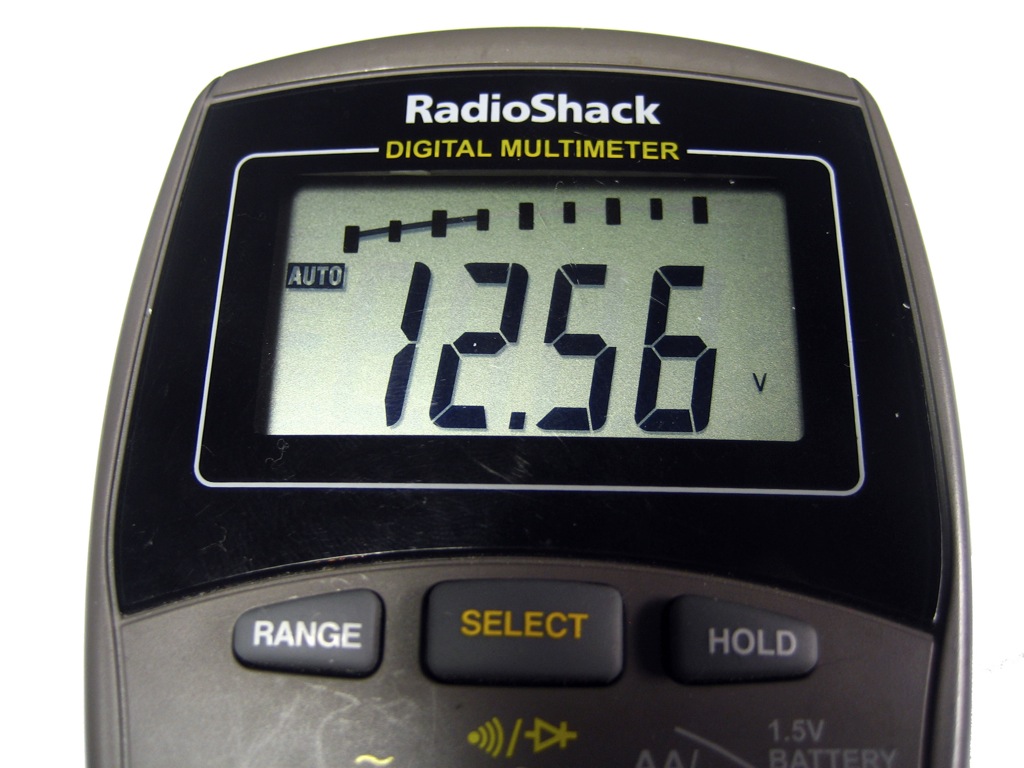
  1. On your multimeter you should see a reading of the voltage coming from your power supply. If you are checking a 12V power supply and your multimeter shows "12.56V" everything is fine and dandy. If you get a reading of "-12.56V" then your probes are attached in reverse. If this happens and you are positive you connected your probes correctly, double check the polarity on your power supply's label and make sure the circuit you will be powering with this unit is designed to handle this polarity.
January 22, 2009, at 06:06 PM by rmn236 -
Added lines 45-46:

It is always good practice to test a power supply before using it for the first time.

January 22, 2009, at 06:04 PM by rmn236 -
Deleted lines 21-22:
Changed lines 30-31 from:

Abbreviations

to:

Abbreviations

January 22, 2009, at 06:03 PM by rmn236 -
Changed lines 54-55 from:

If the voltage showing on your multimeter is more than half a volt or a volt off its rating, then you most likely have what is called an unregulated power supply. The 12V Jameco power supply we used is this example is a regulated one, so that is why the voltage we received was so close to the voltage it was rated for.

to:

If the voltage showing on your multimeter is more than half a volt or a volt off its rating, then you most likely have what is called an unregulated power supply. The 12V Jameco power supply we used in this example is a regulated one, so that is why the voltage we received was so close to the voltage it was rated for.

January 22, 2009, at 06:03 PM by rmn236 -
Changed line 51 from:
  1. On your multimeter you should see a reading of the voltage coming from your power supply. If you are checking a 12V power supply and your multimeter shows "12.54V" everything is fine and dandy. If you get a reading of "-12.54V" then your probes are attached in reverse. If this happens and you are positive you connected your probes correctly, double check the polarity on your power supplies label and make sure the circuit you will be power with this unit is designed to handle this polarity.
to:
  1. On your multimeter you should see a reading of the voltage coming from your power supply. If you are checking a 12V power supply and your multimeter shows "12.54V" everything is fine and dandy. If you get a reading of "-12.54V" then your probes are attached in reverse. If this happens and you are positive you connected your probes correctly, double check the polarity on your power supply's label and make sure the circuit you will be powering with this unit is designed to handle this polarity.
Added lines 54-55:

If the voltage showing on your multimeter is more than half a volt or a volt off its rating, then you most likely have what is called an unregulated power supply. The 12V Jameco power supply we used is this example is a regulated one, so that is why the voltage we received was so close to the voltage it was rated for.

January 22, 2009, at 06:00 PM by rmn236 -
Changed line 47 from:
  1. Plug your power supply into an AC outlet. http://itp.nyu.edu/physcomp/images/powersupply_notes/check_powersupply.jpg
to:
  1. Plug your power supply into an AC outlet. http://itp.nyu.edu/physcomp/images/powersupply_notes/check_powersupply.jpg
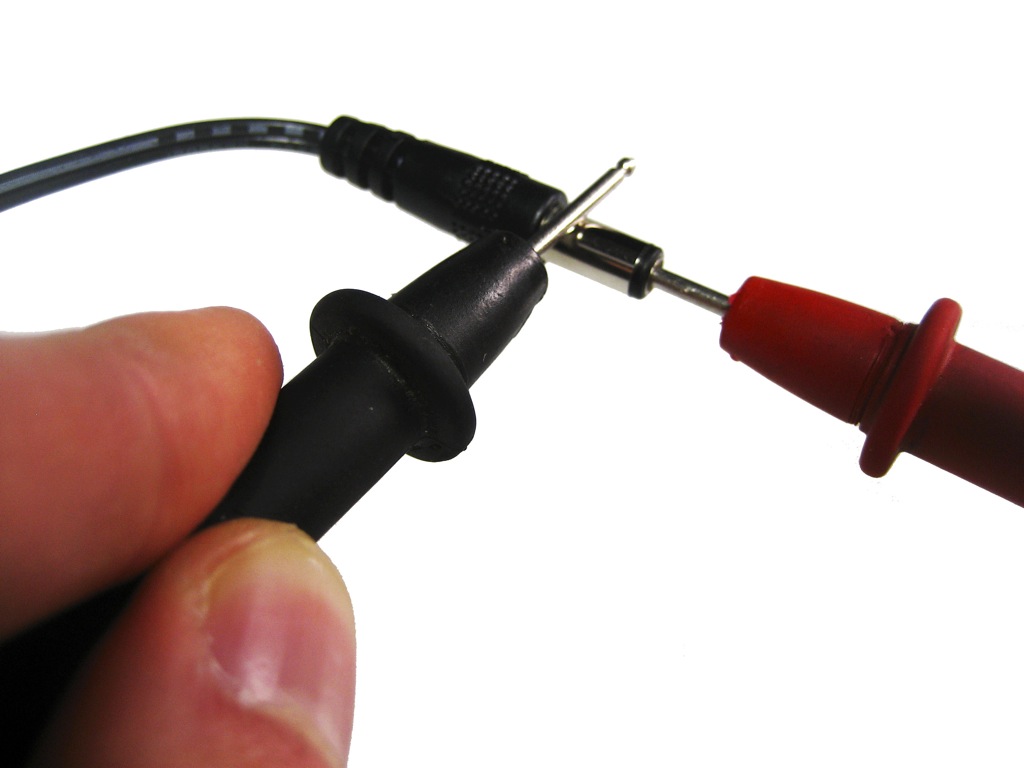
    Red probe goes into the tip
    Black probe touches the barrel
January 22, 2009, at 05:54 PM by rmn236 -
Changed lines 52-53 from:
to:

http://itp.nyu.edu/physcomp/images/powersupply_notes/multimeter.jpg

January 22, 2009, at 05:53 PM by rmn236 -
Changed line 47 from:
  1. Plug your power supply into an AC outlet.
to:
  1. Plug your power supply into an AC outlet. http://itp.nyu.edu/physcomp/images/powersupply_notes/check_powersupply.jpg
Deleted line 48:

http://itp.nyu.edu/physcomp/images/powersupply_notes/check_powersupply.jpg

January 22, 2009, at 05:52 PM by rmn236 -
Changed lines 48-49 from:
  1. Turn on your multimeter and set it to read DC voltage. http://itp.nyu.edu/physcomp/images/powersupply_notes/check_powersupply.jpg
to:
  1. Turn on your multimeter and set it to read DC voltage.

http://itp.nyu.edu/physcomp/images/powersupply_notes/check_powersupply.jpg

January 22, 2009, at 05:52 PM by rmn236 -
Changed line 48 from:
  1. Turn on your multimeter and set it to read DC voltage. http://itp.nyu.edu/physcomp/images/powersupply_notes/check_powersupply.jpg
to:
  1. Turn on your multimeter and set it to read DC voltage. http://itp.nyu.edu/physcomp/images/powersupply_notes/check_powersupply.jpg
January 22, 2009, at 05:52 PM by rmn236 -
Changed line 48 from:
  1. Turn on your multimeter and set it to read DC voltage. http://itp.nyu.edu/physcomp/images/powersupply_notes/check_powersupply.jpg
to:
  1. Turn on your multimeter and set it to read DC voltage. http://itp.nyu.edu/physcomp/images/powersupply_notes/check_powersupply.jpg
January 22, 2009, at 05:51 PM by rmn236 -
Changed line 48 from:
  1. Turn on your multimeter and set it to read DC voltage. http://itp.nyu.edu/physcomp/images/powersupply_notes/check_powersupply.jpg | Testing your power supply
to:
  1. Turn on your multimeter and set it to read DC voltage. http://itp.nyu.edu/physcomp/images/powersupply_notes/check_powersupply.jpg
January 22, 2009, at 05:49 PM by rmn236 -
January 22, 2009, at 05:48 PM by rmn236 -
Changed line 48 from:
  1. Turn on your multimeter and set it to read DC voltage. http://itp.nyu.edu/physcomp/images/check_powersupply.jpg | Testing your power supply
to:
  1. Turn on your multimeter and set it to read DC voltage. http://itp.nyu.edu/physcomp/images/powersupply_notes/check_powersupply.jpg | Testing your power supply
January 22, 2009, at 05:47 PM by rmn236 -
Changed lines 48-49 from:
  1. Turn on your multimeter and set it to read DC voltage.
  2. Take the red (positive) probe from your multimeter and stick it into the end of the power supply plug. http://itp.nyu.edu/physcomp/uploads/power_supply_polarity_01.jpg | Positive Polarity
to:
  1. Turn on your multimeter and set it to read DC voltage. http://itp.nyu.edu/physcomp/images/check_powersupply.jpg | Testing your power supply
  2. Take the red (positive) probe from your multimeter and stick it into the end of the power supply plug.
January 22, 2009, at 05:46 PM by rmn236 -
Changed lines 49-50 from:
  1. Take the red (positive) probe from your multimeter and stick it into the end of the power supply plug.

http://itp.nyu.edu/physcomp/uploads/power_supply_polarity_01.jpg | Positive Polarity

to:
  1. Take the red (positive) probe from your multimeter and stick it into the end of the power supply plug. http://itp.nyu.edu/physcomp/uploads/power_supply_polarity_01.jpg | Positive Polarity
January 22, 2009, at 05:46 PM by rmn236 -
Added line 50:

http://itp.nyu.edu/physcomp/uploads/power_supply_polarity_01.jpg | Positive Polarity

January 22, 2009, at 05:46 PM by rmn236 -
Changed lines 50-52 from:
  1. Take the black (negative) probe from your multimeter and carefully touch it against the barrel of the plug without touching the tip or your red probe.
  2. On your multimeter you should see a reading of the voltage coming from your power supply. If you are checking a 12V power supply and your multimeter shows "12.54V"
to:
  1. Take the black (negative) probe from your multimeter and carefully touch it against the barrel of the plug without touching the tip or your red probe. If you make a connection, you will be creating a short circuit.
  2. On your multimeter you should see a reading of the voltage coming from your power supply. If you are checking a 12V power supply and your multimeter shows "12.54V" everything is fine and dandy. If you get a reading of "-12.54V" then your probes are attached in reverse. If this happens and you are positive you connected your probes correctly, double check the polarity on your power supplies label and make sure the circuit you will be power with this unit is designed to handle this polarity.
January 22, 2009, at 05:42 PM by rmn236 -
Changed lines 15-16 from:

Part# 170245 (12V, 1000mA)''' Available at the NYU computer store.

to:

Part# 170245 (12V, 1000mA)'''
Available at the NYU computer store.

January 22, 2009, at 05:42 PM by rmn236 -
Changed lines 14-15 from:

Jameco 12V Regulated Switching Power Supply\\Part# 170245 (12V, 1000mA) Available at the NYU computer store.

to:

Jameco 12V Regulated Switching Power Supply
Part# 170245 (12V, 1000mA)
Available at the NYU computer store.

January 22, 2009, at 05:41 PM by rmn236 -
Changed line 14 from:

Jameco 12V Regulated Switching Power Supply, Part# 170245 (12V, 1000mA) Available at the NYU computer store.

to:

Jameco 12V Regulated Switching Power Supply\\Part# 170245 (12V, 1000mA) Available at the NYU computer store.

January 22, 2009, at 05:41 PM by rmn236 -
Changed line 3 from:

Power supply is a reference to a source of electrical power.

to:

Power supply is a reference to the source of electrical power.

Changed lines 6-7 from:

There are many different kinds of DC Power Supplies but this one is most commonly used here at ITP:

to:

There are many different kinds of DC power supplies but this one is most commonly used here at ITP:

Changed line 14 from:

Jameco 170245 (12V, 1000mA) Available at the NYU computer store.

to:

Jameco 12V Regulated Switching Power Supply, Part# 170245 (12V, 1000mA) Available at the NYU computer store.

Added lines 45-50:
  1. Plug your power supply into an AC outlet.
  2. Turn on your multimeter and set it to read DC voltage.
  3. Take the red (positive) probe from your multimeter and stick it into the end of the power supply plug.
  4. Take the black (negative) probe from your multimeter and carefully touch it against the barrel of the plug without touching the tip or your red probe.
  5. On your multimeter you should see a reading of the voltage coming from your power supply. If you are checking a 12V power supply and your multimeter shows "12.54V"
January 22, 2009, at 05:00 PM by rmn236 -
Added line 42:

(:if auth edit:)

Changed lines 45-46 from:

Regulated vs. Unregulated power supplies

to:

Regulated vs. Unregulated power supplies

(:if:)

January 22, 2009, at 05:00 PM by rmn236 -
Changed lines 40-44 from:

AC : Alternating Current\\

to:

AC : Alternating Current

Testing your power supply

Regulated vs. Unregulated power supplies

January 22, 2009, at 04:59 PM by rmn236 -
Changed lines 23-25 from:

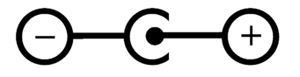
Make sure you know the polarity of the plug so you don't reverse polarity on a component and blow it up. The diagram below showing positive tip polarity on the left and negative tip polarity on the right. The center positive drawing on the left indicates that the center (tip) of the output plug is positive (+) and the barrel of the output plug is negative (-).
to:

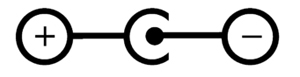
Make sure you know the polarity of the plug so you don't reverse polarity for your circuit and damage your components. The diagram below showing positive tip polarity is on the left and negative tip polarity is on the right. The center positive drawing on the left indicates that the center (tip) of the output plug is positive (+) and the barrel of the output plug is negative (-).

January 22, 2009, at 04:48 PM by rmn236 -
Added line 38:

VDC : Volts DC\\

Changed lines 40-41 from:

AC : Alternating Current

to:

AC : Alternating Current\\

January 22, 2009, at 01:46 PM by hkm218 -
Added line 34:

W : Watts\\

Changed line 40 from:

W : watts

to:
January 22, 2009, at 01:46 PM by hkm218 -
Added line 39:

W : watts

January 22, 2009, at 01:29 PM by hkm218 -
Changed lines 30-38 from:

Abbreviations

V : Volts A : Amperes mA : miliAmperes VA : Volt Amperes VAC : Volts AC DC : Direct Current AC : Alternating Current

to:

Abbreviations

V : Volts
A : Amperes
mA : miliAmperes
VA : Volt Amperes
VAC : Volts AC
DC : Direct Current
AC : Alternating Current\\

January 22, 2009, at 01:28 PM by hkm218 -
Changed lines 30-32 from:

- more information will be added soon
hyeki

to:

Abbreviations

V : Volts A : Amperes mA : miliAmperes VA : Volt Amperes VAC : Volts AC DC : Direct Current AC : Alternating Current

January 22, 2009, at 01:18 PM by hkm218 -
Changed lines 22-23 from:

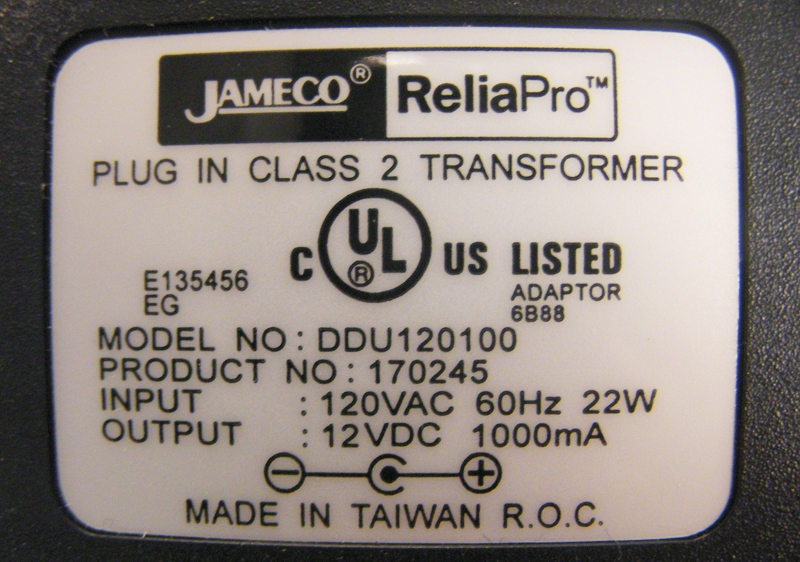
Most power supplies have a rating label that looks something like this.
Make sure you know the polarity of the plug so you don't reverse polarity on a component and blow it up.\\

to:

Most power supplies have a rating label that looks something like this. Make sure you know the polarity of the plug so you don't reverse polarity on a component and blow it up.

January 22, 2009, at 01:18 PM by hkm218 -
Changed lines 22-24 from:

Most power supplies have a rating label that looks something like this. Make sure you know the polarity of the plug so you don't reverse polarity on a component and blow it up.

to:

Most power supplies have a rating label that looks something like this.
Make sure you know the polarity of the plug so you don't reverse polarity on a component and blow it up.
The diagram below showing positive tip polarity on the left and negative tip polarity on the right. The center positive drawing on the left indicates that the center (tip) of the output plug is positive (+) and the barrel of the output plug is negative (-).

January 22, 2009, at 01:00 PM by hkm218 -
Changed lines 23-24 from:
to:

Make sure you know the polarity of the plug so you don't reverse polarity on a component and blow it up.

January 21, 2009, at 07:00 PM by hkm218 -
Added line 21:
Added lines 23-25:

http://itp.nyu.edu/physcomp/uploads/power_supply_polarity_01.jpg | Positive Polarity http://itp.nyu.edu/physcomp/uploads/power_supply_polarity_02.jpg | Negative Polarity

January 21, 2009, at 06:49 PM by hkm218 -
Changed lines 25-26 from:

- more information will be added soon

to:

- more information will be added soon
hyeki

January 21, 2009, at 06:49 PM by hkm218 -
Added line 25:

- more information will be added soon

January 21, 2009, at 06:24 PM by hkm218 -
Changed lines 3-4 from:

Power supply is a reference to a source of electrical power.
Most electronic circuits require a DC power supply.

to:

Power supply is a reference to a source of electrical power. Most electronic circuits require a DC power supply. \\

January 21, 2009, at 06:23 PM by hkm218 -
Changed line 4 from:

Most electronic circuits require a DC power supply. \\

to:

Most electronic circuits require a DC power supply.

Changed line 14 from:

Jameco 170245 (12V, 1000mA) Available at the NYU computer store.

to:

Jameco 170245 (12V, 1000mA) Available at the NYU computer store.

January 21, 2009, at 06:21 PM by hkm218 -
Added lines 8-9:

- Click on any image for a larger view

Added lines 12-13:
Changed lines 20-21 from:

- Click on any image for a larger view.

to:
January 21, 2009, at 06:20 PM by hkm218 -
Changed lines 16-17 from:
  • Click on any image for a larger view.
to:

- Click on any image for a larger view.

January 21, 2009, at 06:20 PM by hkm218 -
Added lines 15-17:
  • Click on any image for a larger view.
January 21, 2009, at 06:18 PM by hkm218 -
Changed line 9 from:

http://itp.nyu.edu/physcomp/uploads/power_supply_01.jpg | DC Power Supply

to:

http://itp.nyu.edu/physcomp/uploads/power_supply_01.jpg | DC Power Supply

Changed line 14 from:

http://itp.nyu.edu/physcomp/uploads/power_supply_02.jpg | A rating label

to:

http://itp.nyu.edu/physcomp/uploads/power_supply_02.jpg | A rating label

January 21, 2009, at 06:12 PM by hkm218 -
Changed lines 1-2 from:

Power supply is a reference to a source of electrical power. A device or system that supplies electrical or other types of energy to an output load or group of loads is called a power supply unit.

to:

Overview

Power supply is a reference to a source of electrical power.
Most electronic circuits require a DC power supply.
The most common operating voltages for microcontrollers and digital processors are 5V and 3.3V.
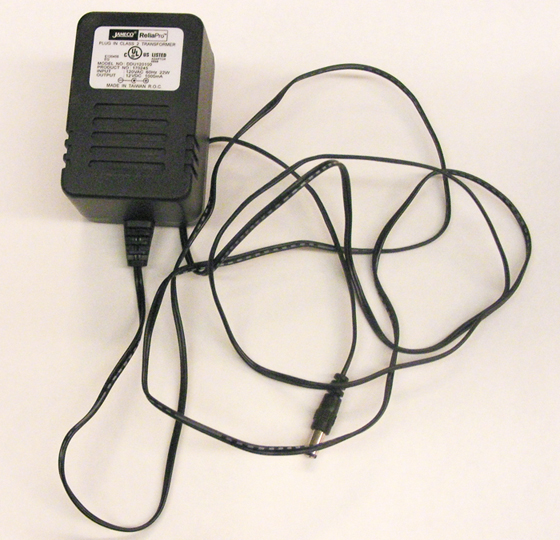
There are many different kinds of DC Power Supplies but this one is most commonly used here at ITP:


http://itp.nyu.edu/physcomp/uploads/power_supply_01.jpg | DC Power Supply Jameco 170245 (12V, 1000mA) Available at the NYU computer store.


http://itp.nyu.edu/physcomp/uploads/power_supply_02.jpg | A rating label Most power supplies have a rating label that looks something like this.

January 21, 2009, at 05:06 PM by hkm218 -
Added lines 1-2:

Power supply is a reference to a source of electrical power. A device or system that supplies electrical or other types of energy to an output load or group of loads is called a power supply unit.

  Edit | View | History | Print | Recent Changes | Search Page last modified on May 14, 2009, at 04:41 PM